Costruire una pagina web con i tag <div id=”…”> e un foglio CSS nella maniera seguente:
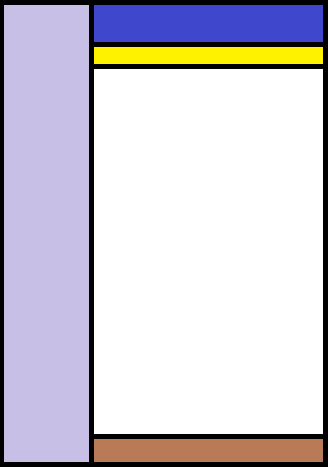
Costruire una pagina web con i tag <div id=”…”> e un foglio CSS nella maniera seguente:
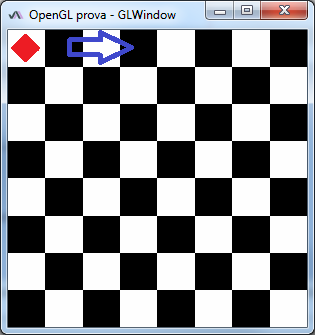
    GLWindow window;
    FPSAnimator animator;
    GLRenderer renderer;

    public Main() {
        initComponents();

        window = GLWindow.create(new GLCapabilities(GLProfile.getDefault()));
        window.setTitle("OpenGL prova - GLWindow");
        window.setSize(800, 600);
        renderer = new GLRenderer();
        window.addGLEventListener(renderer);
        animator = new FPSAnimator(window, 60, true);
    }
    private void btnHideActionPerformed(java.awt.event.ActionEvent evt) {
        window.setVisible(false);
    }

    private void btnShowActionPerformed(java.awt.event.ActionEvent evt) {
        window.setVisible(true);
    }

    private void btnStartActionPerformed(java.awt.event.ActionEvent evt) {
        animator.start();
    }

    private void btnStopActionPerformed(java.awt.event.ActionEvent evt) {
        animator.stop();
    }

    private void btnFullscreenActionPerformed(java.awt.event.ActionEvent evt) {
        window.setFullscreen(btnFullscreen.isSelected());
    }
    double a = 0.0;

    @Override
    public void display(GLAutoDrawable drawable) {
        GL2 gl = drawable.getGL().getGL2();

        gl.glClear(GL2.GL_COLOR_BUFFER_BIT);

        gl.glBegin(GL2.GL_QUADS);
        gl.glColor3f(1, 1, 1);
        for (int i = -4; i < 4; i++) {
            for (int j = -4; j < 4; j++) {
                if ((i + j) % 2 != 0) {
                    gl.glVertex2d(i / 4.0, j / 4.0);
                    gl.glVertex2d(i / 4.0 + 0.25, j / 4.0);
                    gl.glVertex2d(i / 4.0 + 0.25, j / 4.0 + 0.25);
                    gl.glVertex2d(i / 4.0, j / 4.0 + 0.25);
                }
            }
        }
        gl.glEnd();

        // inserire un rombo rosso che si sposta da sinistra a destra

        a += 0.01;
    }
Scaricare, stampare e portare in classe la seguente prova INVALSI:
http://www.invalsi.it/areadati/concidee/Prova_Matematica_II_SUPERIORE.pdf
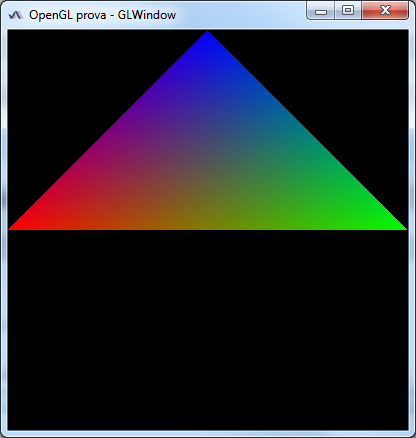
import javax.media.opengl.GL;
import javax.media.opengl.GL2;
import javax.media.opengl.GLAutoDrawable;
import javax.media.opengl.GLEventListener;

public class GLRenderer implements GLEventListener {

    @Override
    public void init(GLAutoDrawable drawable) { }

    @Override
    public void dispose(GLAutoDrawable drawable) { }

    @Override
    public void display(GLAutoDrawable drawable) {
        GL2 gl = drawable.getGL().getGL2();

        gl.glClear(GL.GL_COLOR_BUFFER_BIT);   // cancella la finestra

        gl.glBegin(GL.GL_TRIANGLES);
        gl.glColor3f(1, 0, 0);   // il 1° vertice è rosso
        gl.glVertex2d(-1, 0);
        gl.glColor3f(0, 1, 0);   // il 2° vertice è verde
        gl.glVertex2d(1, 0);
        gl.glColor3f(0, 0, 1);   // il 3° vertice è blu
        gl.glVertex2d(0, 1);
        gl.glEnd();
    }

    @Override
    public void reshape(GLAutoDrawable drawable, int x, int y, int width, int height) { }

}
Introduzione a OpenGL ed esempi di programmazione:
robot.unipv.it/robolab-website/courses/16-computer-graphics
www3.ntu.edu.sg/home/ehchua/programming/opengl/JOGL2.0.html
Download delle librerie OpenGL per Java dal sito jogamp.org
Istruzioni per l’installazione:
Programma di esempio:
    private void salva(java.awt.event.ActionEvent evt) {
        JFileChooser chooser = new JFileChooser();
        FileNameExtensionFilter filter = new FileNameExtensionFilter("File di testo (*.txt)", "txt");
        chooser.setFileFilter(filter);
        int returnVal = chooser.showSaveDialog(this);
        if (returnVal == JFileChooser.APPROVE_OPTION) {
            try {
                FileWriter fw = new FileWriter(chooser.getSelectedFile());
                BufferedWriter bw = new BufferedWriter(fw);
                bw.write(txtTesto.getText());
                bw.close();
                JOptionPane.showMessageDialog(this, "Salvataggio eseguito correttamente", "Messaggio", JOptionPane.INFORMATION_MESSAGE);
            } catch (IOException ex) {
                JOptionPane.showMessageDialog(this, "Si è verificato un errore nella scrittura del file", "Errore", JOptionPane.ERROR_MESSAGE);
            }
        }
    }

    private void apri(java.awt.event.ActionEvent evt) {
        JFileChooser chooser = new JFileChooser();
        FileNameExtensionFilter filter = new FileNameExtensionFilter("File di testo (*.txt)", "txt");
        chooser.setFileFilter(filter);
        int returnVal = chooser.showOpenDialog(this);
        if (returnVal == JFileChooser.APPROVE_OPTION) {
            txtTesto.setText("");
            try {
                FileReader fr = new FileReader(chooser.getSelectedFile());
                BufferedReader br = new BufferedReader(fr);
                String riga;
                while ((riga = br.readLine()) != null) {
                    txtTesto.append(riga + "\n");
                }
                br.close();
                JOptionPane.showMessageDialog(this, "Il file è stato caricato correttamente", "Informazione", JOptionPane.INFORMATION_MESSAGE);
            } catch (IOException ex) {
                JOptionPane.showMessageDialog(this, "Il file non è stato caricato correttamente", "Errore", JOptionPane.ERROR_MESSAGE);
            }
        }
    }
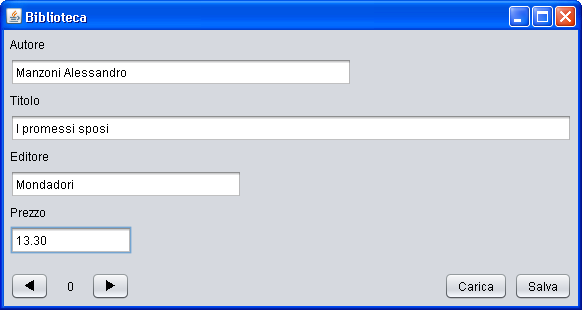
package biblioteca;

import java.io.BufferedReader;
import java.io.BufferedWriter;
import java.io.FileReader;
import java.io.FileWriter;
import java.io.IOException;
import javax.swing.JOptionPane;

public class Main extends javax.swing.JFrame {

    private int pos;
    private Libro[] libri;

    public Main() {
        initComponents();
        libri = new Libro[100];
        for (int i = 0; i < 100; i++) {
            libri[i] = new Libro();
        }
        pos = 0;
    }

[...]
    private void Left(java.awt.event.ActionEvent evt) {
        libri[pos].setAutore(txtAutore.getText());
        libri[pos].setEditore(txtEditore.getText());
        libri[pos].setPrezzo(txtPrezzo.getText());
        libri[pos].setTitolo(txtTitolo.getText());
        pos--;
        if (pos < 0) {
            pos = 0;
        }
        lblPos.setText("" + pos);
        txtAutore.setText(libri[pos].getAutore());
        txtTitolo.setText(libri[pos].getTitolo());
        txtEditore.setText(libri[pos].getEditore());
        txtPrezzo.setText(libri[pos].getPrezzo());
    }

    private void btnRightActionPerformed(java.awt.event.ActionEvent evt) {
        libri[pos].setAutore(txtAutore.getText());
        libri[pos].setEditore(txtEditore.getText());
        libri[pos].setPrezzo(txtPrezzo.getText());
        libri[pos].setTitolo(txtTitolo.getText());
        pos++;
        if (pos > 100) {
            pos = 100;
        }
        lblPos.setText("" + pos);
        txtAutore.setText(libri[pos].getAutore());
        txtTitolo.setText(libri[pos].getTitolo());
        txtEditore.setText(libri[pos].getEditore());
        txtPrezzo.setText(libri[pos].getPrezzo());
    }

    private void btnSalvaActionPerformed(java.awt.event.ActionEvent evt) {
        try {
            FileWriter fw = new FileWriter("Biblioteca.csv");
            BufferedWriter bw = new BufferedWriter(fw);
            for (int i = 0; i < 100; i++) {
                bw.write(libri[i].getAutore() + ";" + libri[i].getTitolo() + ";" + libri[i].getEditore() + ";" + libri[i].getPrezzo());
                bw.newLine();
            }
            bw.close();
            JOptionPane.showMessageDialog(this, "Archivio salvato", "Informazione", JOptionPane.INFORMATION_MESSAGE);
        } catch (IOException ex) {
            JOptionPane.showMessageDialog(this, "Errore nel salvataggio dell'archivio", "Errore", JOptionPane.ERROR_MESSAGE);
        }
    }

    private void btnCaricaActionPerformed(java.awt.event.ActionEvent evt) {
        try {
            FileReader fr = new FileReader("Biblioteca.csv");
            BufferedReader br = new BufferedReader(fr);
            for (int i = 0; i < 100; i++) {
                String riga = br.readLine();
                String[] campi = riga.split(";");
                libri[i].setAutore(campi[0]);
                libri[i].setTitolo(campi[1]);
                libri[i].setEditore(campi[2]);
                libri[i].setPrezzo(campi[3]);
            }
            br.close();
            JOptionPane.showMessageDialog(this, "Archivio caricato", "Informazione", JOptionPane.INFORMATION_MESSAGE);
            txtAutore.setText(libri[pos].getAutore());
            txtTitolo.setText(libri[pos].getTitolo());
            txtEditore.setText(libri[pos].getEditore());
            txtPrezzo.setText(libri[pos].getPrezzo());
        } catch (IOException ex) {
            JOptionPane.showMessageDialog(this, "Errore nel caricamento dell'archivio", "Errore", JOptionPane.ERROR_MESSAGE);
        }
    }

[...]
}
Realizzare un programma che permetta all’utente di inserire la base di una tabellina in una casella di testo. Mediante un tasto Crea, viene costruita la tabellina nel formato:
2 × 1 = 2
2 × 2 = 4
etc.
all’interno di una textArea. Un bottone Salva, permette di salvare tutta la tabellina in un file avente come titolo TabellinaDel2.txt (il 2 deve variare se la tabellina è del 3 o del 4 etc.). Un bottone Apre deve leggere dal file giusto la tabellina richiesta mediante l’inserimento della base nella casella di testo.
http://www.youtube.com/watch?v=lgEGDkJiB9M