package pallina;

import java.awt.Color;
import java.awt.Dimension;
import java.awt.Graphics;
import java.awt.event.MouseEvent;
import java.awt.event.MouseListener;
import java.awt.event.MouseMotionListener;

import javax.swing.JPanel;

public class JCoordinate extends JPanel implements MouseMotionListener, MouseListener {

	private int x = 0, y = 0;

	public JCoordinate() {
		this.setPreferredSize(new Dimension(100, 100));
		this.addMouseMotionListener(this);
		this.addMouseListener(this);
	}

	@Override
	protected void paintComponent(Graphics g) {
		super.paintComponent(g);

		int w = this.getWidth();
		int h = this.getHeight();

		g.setColor(Color.LIGHT_GRAY);
		g.fillRect(0, 0, w, h);
		g.setColor(Color.BLACK);
		g.drawString("(" + x + "," + y + ")", x, y);
	}

	@Override
	public void mouseDragged(MouseEvent me) {
	}

	@Override
	public void mouseMoved(MouseEvent me) {
		x = me.getX();
		y = me.getY();
		this.repaint();
	}

	@Override
	public void mouseClicked(MouseEvent e) {
		JPanel box = new JPanel();
		box.setSize(5, 5);
		box.setLocation(x, y);
		box.setBackground(Color.RED);
		box.setVisible(true);
		this.add(box);
		this.repaint();
	}

	@Override
	public void mouseEntered(MouseEvent e) {

	}

	@Override
	public void mouseExited(MouseEvent e) {
	}

	@Override
	public void mousePressed(MouseEvent e) {
	}

	@Override
	public void mouseReleased(MouseEvent e) {
	}

}
Mese: Settembre 2015
Esercizi per la 3E
Un corpo ha una velocità di 30 m/s che forma un angolo di 50° rispetto alla verticale in direzione Sud Est. Tiene questa velocità per 4 minuti. Mantiene per i successivi 7 minuti una velocità di 20 m/s lungo la direzione Ovest. Calcolare le coordinate della posizione finale sapendo che è partito dall’origine.
Un aereo sta tenendo una velocità di crociera di 780 km/h. Compie per un tempo di 12 secondi una virata che produce sull’aereo un’accelerazione diretta pependicolarmente alla direzione del moto di intensità 35 m/s^2. Calcolare la nuova velocità vettoriale.
Grafico settimanale delle temperature
Consultare anche il PDF presente alla pagina https://liceocuneo.it/oddenino/informatica/java/interfacce-per-la-gestione-degli-eventi/
JGrafico
package grafico;

import java.awt.Color;
import java.awt.Dimension;
import java.awt.Graphics;
import java.awt.event.MouseEvent;
import java.awt.event.MouseMotionListener;

import javax.swing.JPanel;
import javax.swing.border.LineBorder;

public class JGrafico extends JPanel implements MouseMotionListener {

	String[] giorni = new String[7];
	String[] temperature = new String[9];

	public JGrafico() {
		setBorder(new LineBorder(new Color(0, 0, 0), 2));
		setForeground(Color.BLACK);
		this.setPreferredSize(new Dimension(200, 200));
		this.setBackground(Color.WHITE);

		giorni[0] = "Sun";
		giorni[1] = "Mon";
		giorni[2] = "Tue";
		giorni[3] = "Wed";
		giorni[4] = "Thu";
		giorni[5] = "Fri";
		giorni[6] = "Sat";

		temperature[0] = "40";
		temperature[1] = "30";
		temperature[2] = "20";
		temperature[3] = "10";
		temperature[4] = "0";
		temperature[5] = "-10";
		temperature[6] = "-20";
		temperature[7] = "-30";
		temperature[8] = "-40";

		this.addMouseMotionListener(this);
	}

	protected void paintComponent(Graphics g) {
		super.paintComponent(g);

		int w = this.getWidth(), h = this.getHeight();
		g.drawLine(0, h / 2, w, h / 2);

		int w7 = w / 7, w14 = w / 14, h2 = h / 2;
		for (int i = 0; i < 7; i++) {
			g.drawLine(w14 + i * w7, h2 - 10, w14 + i * w7, h2 + 10);
			g.drawString(giorni[i], w14 + i * w7, h2 + 25);
		}
		int h10 = h / 10;
		for (int i = 0; i < 9; i++) {
			g.drawLine(0, h10 + i * h10, 10, h10 + i * h10);
			// g.drawString(temperature[i], 10, h10+i*h10);
		}
	}

	@Override
	public void mouseDragged(MouseEvent arg0) {
	}

	@Override
	public void mouseMoved(MouseEvent me) {
		int x = me.getX();
		int y = me.getY();
		System.out.println(x+" "+y);
	}

}
Pallina

JBall
package pallina;

import java.awt.Color;
import java.awt.Component;
import java.awt.Dimension;
import java.awt.Graphics;
import java.awt.Graphics2D;
import java.awt.RenderingHints;

import javax.swing.JComponent;

public class JBall extends JComponent implements Runnable {

	private boolean running = false;
	private int vx = 10, vy = 10;

	public JBall() {
		this.setPreferredSize(new Dimension(15, 15));
	}

	public boolean isRunning() {
		return running;
	}

	public void setRunning(boolean running) {
		this.running = running;
	}

	public int getVx() {
		return vx;
	}

	public void setVx(int vx) {
		if (Math.abs(vx) <= 10)
			this.vx = vx;
	}

	public int getVy() {
		return vy;
	}

	public void setVy(int vy) {
		if (Math.abs(vy) <= 10)
			this.vy = vy;
	}

	@Override
	protected void paintComponent(Graphics g) {
		super.paintComponent(g);

		int w = this.getWidth();
		int h = this.getHeight();

		Graphics2D g2 = (Graphics2D) g;
		g2.setRenderingHint(RenderingHints.KEY_ANTIALIASING, RenderingHints.VALUE_ANTIALIAS_ON);
		g2.setColor(Color.GREEN);
		g2.fillOval(0, 0, w, h);
		g2.setColor(Color.BLACK);
		g2.drawOval(0, 0, w - 1, h - 1);
	}

	public void start() {
		if (!running) {
			running = true;
			Thread t = new Thread(this);
			t.setDaemon(true);
			t.start();
		}
	}

	public void stop() {
		running = false;
	}

	@Override
	public void run() {
		while (running) {
			int x = this.getX();
			int y = this.getY();
			x += vx;
			y += vy;
			Component contenitore = this.getParent();
			if (x < 0) {
				vx = Math.abs(vx);
				x += vx;
			}
			if (x > contenitore.getWidth() - this.getWidth()) {
				vx = -Math.abs(vx);
				x += vx;
			}
			if (y < 0) {
				vy = Math.abs(vy);
				y += vy;
			}
			if (y > contenitore.getHeight() - this.getHeight()) {
				vy = -Math.abs(vy);
				y += vy;
			}
			this.setLocation(x, y);
			try {
				Thread.sleep(20);
			} catch (InterruptedException e) {
			}
		}

	}

}
Main
package pallina;

import java.awt.EventQueue;

import javax.swing.JFrame;
import javax.swing.SpringLayout;
import javax.swing.JPanel;
import javax.swing.border.LineBorder;
import java.awt.Color;
import javax.swing.JButton;
import java.awt.event.ActionListener;
import java.awt.event.ActionEvent;

public class Main extends JFrame {

	private JBall ball;

	/**
	 * Launch the application.
	 */
	public static void main(String[] args) {
		EventQueue.invokeLater(new Runnable() {
			public void run() {
				try {
					Main frame = new Main();
					frame.setVisible(true);
				} catch (Exception e) {
					e.printStackTrace();
				}
			}
		});
	}

	/**
	 * Create the frame.
	 */
	public Main() {
		setTitle("Pallina");
		setBounds(100, 100, 450, 300);
		setDefaultCloseOperation(JFrame.EXIT_ON_CLOSE);
		SpringLayout springLayout = new SpringLayout();
		getContentPane().setLayout(springLayout);

		JButton btnStart = new JButton("Start");
		btnStart.addActionListener(new ActionListener() {
			public void actionPerformed(ActionEvent arg0) {
				start();
			}
		});
		springLayout.putConstraint(SpringLayout.WEST, btnStart, 10, SpringLayout.WEST, getContentPane());
		springLayout.putConstraint(SpringLayout.SOUTH, btnStart, -10, SpringLayout.SOUTH, getContentPane());
		getContentPane().add(btnStart);

		JButton btnStop = new JButton("Stop");
		btnStop.addActionListener(new ActionListener() {
			public void actionPerformed(ActionEvent e) {
				stop();
			}
		});
		springLayout.putConstraint(SpringLayout.NORTH, btnStop, 0, SpringLayout.NORTH, btnStart);
		springLayout.putConstraint(SpringLayout.WEST, btnStop, 6, SpringLayout.EAST, btnStart);
		getContentPane().add(btnStop);

		JPanel panel = new JPanel();
		panel.setLayout(null);
		panel.setBackground(Color.WHITE);
		panel.setBorder(new LineBorder(new Color(0, 0, 0)));
		springLayout.putConstraint(SpringLayout.NORTH, panel, 10, SpringLayout.NORTH, getContentPane());
		springLayout.putConstraint(SpringLayout.WEST, panel, 10, SpringLayout.WEST, getContentPane());
		springLayout.putConstraint(SpringLayout.EAST, panel, -10, SpringLayout.EAST, getContentPane());
		springLayout.putConstraint(SpringLayout.SOUTH, panel, -6, SpringLayout.NORTH, btnStart);
		getContentPane().add(panel);

		ball = new JBall();
		ball.setBounds(10, 10, 15, 15);
		panel.add(ball);
	}

	private void start() {
		ball.start();
	}

	private void stop() {
		ball.stop();
	}

}
Progetto Eclipse: Pallina
Esercizi per la 3E
Una mosca si trova in una stanza in un punto posto alle coordinate (1,5;2,2;1,4) m. Dopo 10 s si trova un un altro punto posto alle coordinate (4,1;1,2;3,5) m. Calcola il vettore velocità media.
Un aereo sta viaggiando verso Sud con una velocità di 300 m/s. Improvvisamente compie una virata verso Est di 52° diminuendo la sua velocità a 250 m/s in un tempo pari a 8 s. Calcola l’accelerazione media vettoriale e il suo modulo. Rappresenta anche graficamente i due vettori velocità e il vettore accelerazione.
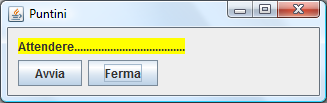
Esempio di thread per la 5E
JDot
package puntini;

import java.awt.Color;

import javax.swing.JLabel;

public class JDot extends JLabel implements Runnable {

	private String s = "Attendere";
	private boolean running = false;

	public JDot() {
		this.setText(s);
		this.setOpaque(true);
		this.setBackground(Color.YELLOW);
	}

	public void start() {
		if (!running) {
			running = true;
			Thread t = new Thread(this);
			t.setDaemon(true);
			t.start();
		}
	}

	public void stop() {
		running = false;
	}

	@Override
	public void run() {
		while (running) {
			s += '.';
			this.setText(s);
			try {
				Thread.sleep(1000);
			} catch (InterruptedException e) {
			}
		}
	}

}
Main
package puntini;

import java.awt.EventQueue;

import javax.swing.JFrame;
import javax.swing.SpringLayout;
import javax.swing.JButton;
import java.awt.event.ActionListener;
import java.awt.event.ActionEvent;

public class Main extends JFrame {
	private JDot jDot;

	/**
	 * Launch the application.
	 */
	public static void main(String[] args) {
		EventQueue.invokeLater(new Runnable() {
			public void run() {
				try {
					Main frame = new Main();
					frame.setVisible(true);
				} catch (Exception e) {
					e.printStackTrace();
				}
			}
		});
	}

	/**
	 * Create the frame.
	 */
	public Main() {
		setTitle("Puntini");
		setBounds(100, 100, 450, 300);
		setDefaultCloseOperation(JFrame.EXIT_ON_CLOSE);
		SpringLayout springLayout = new SpringLayout();
		getContentPane().setLayout(springLayout);

		jDot = new JDot();
		springLayout.putConstraint(SpringLayout.NORTH, jDot, 10, SpringLayout.NORTH, getContentPane());
		springLayout.putConstraint(SpringLayout.WEST, jDot, 10, SpringLayout.WEST, getContentPane());
		getContentPane().add(jDot);

		JButton btnAvvia = new JButton("Avvia");
		btnAvvia.addActionListener(new ActionListener() {
			public void actionPerformed(ActionEvent arg0) {
				jDot.start();
			}
		});
		springLayout.putConstraint(SpringLayout.NORTH, btnAvvia, 6, SpringLayout.SOUTH, jDot);
		springLayout.putConstraint(SpringLayout.WEST, btnAvvia, 0, SpringLayout.WEST, jDot);
		getContentPane().add(btnAvvia);

		JButton btnFerma = new JButton("Ferma");
		btnFerma.addActionListener(new ActionListener() {
			public void actionPerformed(ActionEvent e) {
				jDot.stop();
			}
		});
		springLayout.putConstraint(SpringLayout.NORTH, btnFerma, 0, SpringLayout.NORTH, btnAvvia);
		springLayout.putConstraint(SpringLayout.WEST, btnFerma, 6, SpringLayout.EAST, btnAvvia);
		getContentPane().add(btnFerma);
	}
}